One IDE panel for tasks, Git, GitHub, and AI
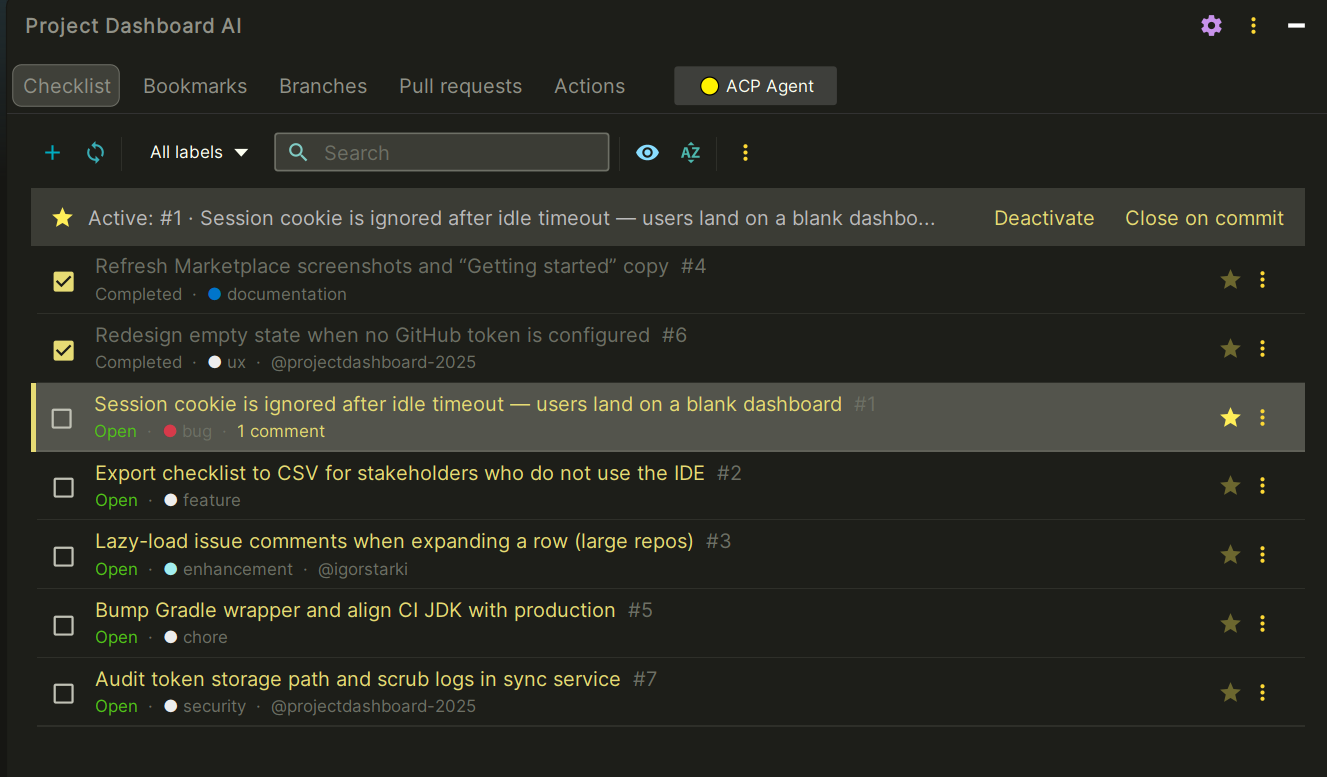
Project Dashboard AI is a side tool window for JetBrains IDEs that keeps your checklist, Git history, and GitHub Issues in one place — and uses AI to speed up the parts that used to mean switching tabs: writing commit messages, triaging issues, and reasoning about your codebase.
Install from JetBrains Marketplace →
Why developers add it
Most IDEs make you choose: keep a mental model of your task list, or keep switching to the browser for GitHub Issues, or keep writing commit messages by hand. Project Dashboard AI removes that choice — everything stays next to your editor, and AI handles the repetitive parts.
- Stop writing commit messages by hand. Stage your changes, and an AI model (your choice of GPT-5.5, Claude Sonnet 5, or Gemini 3.5 Flash) drafts a descriptive commit message from the actual diff — not a generic template.
- Stop tab-switching to GitHub. Issues sync bidirectionally: labels, assignees, comments, and status all stay in sync between your local checklist and GitHub, in real time.
Key features
AI Commit Generation
Generate descriptive commit messages from staged changes using GPT-5.5, Claude Sonnet 5, or Gemini 3.5 Flash. Customizable master prompts let you match your team's commit style and conventions. Read the full guide →
GitHub Issues Integration
Bidirectional sync with GitHub Issues — load, create, and update issues, manage assignees, sync labels, and track comments in real time, without leaving the IDE. Read the full guide →
AI Code Assistant & Smart Code Actions
Right-click any code selection to send it to AI Assistant, attach it to a GitHub Issue comment, or save it to an Issue Notebook — with file path, line numbers, and syntax highlighting captured automatically.
Markdown Notebooks
Personal notes per task, with a full Markdown editor (18 formatting tools), live preview, and direct GitHub Issue integration. Save locally or post as a comment.
Progress Tracking
Completion rates, blocked tasks, overdue items, and commit references — a real picture of where a project stands, generated from your actual checklist and Git activity.
Markdown Sync
Your checklist stays in sync with a project-checklist.md file at your repo root — plain text, version-controlled, works with your existing Git workflow instead of fighting it.
Supported AI providers
Bring your own API key for any of:
| Provider | Models |
|---|---|
| OpenAI | GPT-5.5, GPT-5.4 (Mini, Nano), GPT-5.3-Codex, o3 (Pro, Standard, Mini), o4-mini, GPT-4.1 |
| Anthropic | Claude Fable 5, Claude Opus 4.8, Claude Sonnet 5, Claude Haiku 4.5 |
| Gemini 3.5 Flash, Gemini 3.1 Pro (Preview), Gemini 3.1 Flash-Lite, Gemini 2.5 (Pro, Flash) |
The plugin checks each provider's API for what's currently available and keeps this list up to date automatically — no plugin update needed when a provider adds or retires a model. Switch providers anytime in settings — no reinstall, no lock-in. How model discovery works →
Who it's for
- Developers who want one IDE home for tasks, PRs, and CI context instead of juggling browser tabs.
- Teams already using GitHub Issues who want tighter IDE-level sync.
- Anyone who wants AI help with commits and code review without leaving JetBrains.
Get started
- Install from JetBrains Marketplace.
- Open the Project Dashboard AI tool window.
- Set your AI provider and API key in Settings → Tools → Project Dashboard AI.
- Optionally add a GitHub token for Issues / PR / Actions sync.
Privacy, in plain terms
API keys and tokens are stored in the IDE's own credential system. AI requests go directly to the provider you choose — not through any server we run. Anonymous usage analytics are optional and off by default. Read the full privacy page →